


Page 9 - e_Procurement
P. 9
KSIDC                             K-SWIFT                                                      NIC

               2.  How to Login

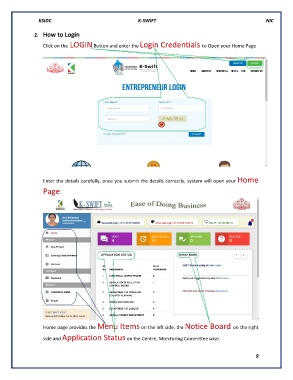
                   Click on the LOGIN Button and enter the Login Credentials to Open your Home Page


                   Enter the details carefully, once you submit the details correctly, system will open your Home


                   Page.


                   Home page provides the Menu Items on the left side, the Notice Board on the right

                   side and Application Status on the Centre, Monitoring Committee wise.

                                                                                                            9

